
Run your .mcpack or .zip through the pack validator to find missing files, broken JSON, mismatched geometry IDs, and texture layout errors before importing.
How to check a pack with the pack validator
The pack validator runs completely in your browser without uploading your files anywhere. It inspects your pack structure, JSON syntax, model links, and textures.
- Drop your
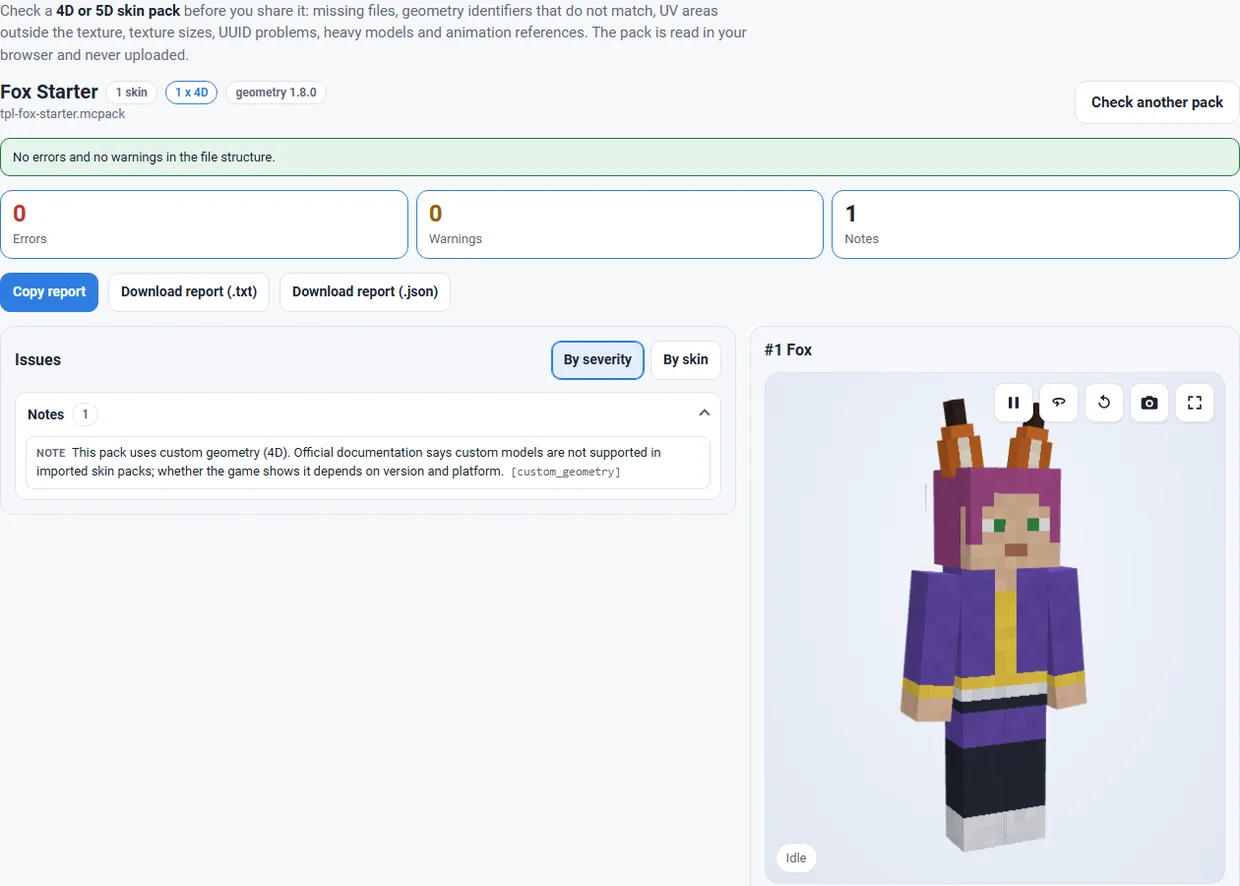
.mcpack,.zip, pack folder, or loose files into the pack validator. Encrypted packs are refused, and an unencrypted pack loads immediately. - Read the overall verdict and the three counters at the top of the results: errors (broken files or missing links), warnings (likely mistakes or oversized models), and notes (harmless quirks).
- Switch the findings view to group by skin instead of grouping by severity so you can see exactly which character in the pack needs repair.
- Filter and inspect the skin table to review each entry's
type,geometry, format, bone and cube counts,texture,cape, and animation slots. - Click a skin in the table to preview it in 3D alongside a filtered list of that specific skin's issues. If a custom geometry ID is broken, the preview shows the standard player model with a warning.
- Copy or download the report as
.txtor.jsonto keep a checklist while you repair the files.
What a clean report means (and does not mean)
A clean report covers file structure only: it proves that your JSON files are valid, your UUIDs are formatted properly, and every texture and model ID points to a real target in the pack.
It does not promise that the game shows the model. Microsoft's official skin pack documentation states that custom models cannot be added through the skin pack JSON, and only documents geometry.humanoid.custom and geometry.humanoid.customSlim. Everything that makes a skin 4D or 5D (geometry.json, custom geometry IDs, animations, cape, enable_attachables) is undocumented behaviour found in real community packs. Because this has not been confirmed in the game across platforms, a 4D skin may not show its extra parts on current versions - if the game ignores the custom geometry, you get the flat standard player shape.
Common findings and how to fix them
Invalid JSON or manifest UUID problems: The tool flags syntax errors, missing header or modules sections in manifest.json, invalid or placeholder UUIDs, and identical header and module UUIDs (official rules require two different UUIDs). Run the pack through the manifest fixer to generate fresh random UUIDs and repair manifest.json without touching your other files.
Geometry ID not defined: The geometry value for a skin in skins.json must match an identifier inside geometry.json letter for letter (including uppercase and lowercase). Open skins.json and geometry.json to make the two strings identical, or load the pack into the 4D skin editor and re-export.
Missing texture or not a PNG: The file named in texture or cape in skins.json is absent from the pack root, or is stored in an unusable console handheld format instead of a standard PNG. Put a valid 32-bit RGBA .png at the root of the pack and make sure the file name matches skins.json.
Texture size ratio does not match UV size: In geometry.json, custom models declare a UV grid size (texturewidth and textureheight in 1.8.0, or texture_width and texture_height in 1.12.0). In real packs, the actual PNG dimensions must equal that declared size or an exact whole multiple of it (for example, a 128x128 PNG on a 64x64 UV layout). Resize your PNG or adjust the declared UV numbers so the aspect ratios match.
UV areas outside the texture: One or more cubes map their uv coordinates outside the declared texturewidth and textureheight canvas. In box UV, a cube of size [w, h, d] needs a rectangle of 2d+2w by d+h texels starting at its uv corner. Open the model in the 4D skin editor to move the overhanging UV boxes back inside the canvas, or raise the declared texture size and enlarge the PNG.
Legacy 64x32 texture note: Some real packs pair a 64x32 PNG with a geometry that declares 64x64. The game is assumed to upgrade the image to 64x64 by mirroring the right arm and leg into the left-limb areas (this has not been confirmed in the game, though our viewer does the same). To remove the note, expand your image canvas to 64x64.
Unknown animation ID: An entry in the animations object in skins.json references an animation ID that is neither included in the pack's animation files nor a known stock player animation. Fix the spelling of the animation ID, add the missing animation file, or remove the broken slot from skins.json.
Heavy model warning: Real packs sometimes contain hundreds of cubes and over a hundred bones. No official source states a cube or bone limit; the validator warns on very heavy models based on our own thresholds. If you want a lighter skin, remove unneeded cubes in the 4D skin editor.
Unused PNG files and unused geometries: Loose images or leftover geometry definitions sit in the pack without being referenced by any skin in skins.json. Pass the pack through the merge and split tool and export your ticked skins - unused geometries and stray files are automatically left behind.
{
  // In skins.json: the geometry and texture keys must match geometry.json and the PNG file
  "skins": [
    {
      "localization_name": "Fox",
      "geometry": "geometry.MyPack.Fox",
      "texture": "fox.png",
      "type": "free"
    }
  ],
  "serialize_name": "MyPack",
  "localization_name": "MyPack"
}Common mistakes
- Using the same UUID for both header and module in
manifest.json. Official rules state the two UUIDs must be different; use the manifest fixer to generate two fresh version-4 UUIDs automatically. - Renaming a geometry ID in
skins.jsonwithout updatinggeometry.json. If the strings do not match exactly, the validator flags an undefined geometry and the 3D preview falls back to the standard player shape. - Saving a skin texture as a 24-bit PNG without an alpha channel. According to an official changelog, 24-bit PNGs stopped being accepted as valid custom skins, so always export textures as 32-bit RGBA PNG files.
- Leaving stray PNGs and abandoned models inside the folder. They bloat the pack and trigger unused-file notes; filter them out cleanly by running the pack through the merge and split tool.
Questions and answers
If the pack validator shows zero errors, will my 4D skin definitely work in Minecraft?
No. A clean report only confirms that the files, JSON keys, UUIDs, and UV coordinates are structured properly. Because custom geometry in skin packs is undocumented by Microsoft and has not been confirmed in the game, a 4D skin may not show its extra parts on current versions.
Why does the 3D preview in the validator show a plain Steve model instead of my 4D model?
That happens when the geometry ID written in skins.json does not match any model identifier inside geometry.json. Check the validator error list for the exact mismatched name and make both files use the exact same spelling.
Are my skin files uploaded to a server when I use the pack validator?
No. Like all of our pack tools, the pack validator runs entirely inside your web browser and nothing is uploaded.
How do I fix a pack that fails with multiple manifest.json and UUID errors?
Open the manifest fixer and drop your pack into it. It rewrites manifest.json with valid structure and two fresh UUIDs while leaving every other file in your pack untouched.