
Use the geometry converter to switch 4D skin models between the old 1.8.0 layout and the newer 1.12.0 layout, either for a single geometry.json file or an entire skin pack.
Why convert between 1.8.0 and 1.12.0
Real 4D skin packs use one of two JSON layouts inside geometry.json: the old 1.8.0 layout (which also appears with 1.10.0, 1.11.0, or no version stamp at all) and the newer 1.12.0 layout. In real packs we measured, the vast majority of 4D skins use 1.8.0, while 1.12.0 is a clear minority. For that reason, the Quick 4D Maker and the 4D skin editor default to 1.8.0, though both also offer 1.12.0.
You normally convert a geometry file for two reasons. First, an editor or tool may expect the other layout when you want to view or edit a model. Second, you might try switching a pack from 1.12.0 to 1.8.0 (or the reverse) when a custom model does not appear.
Keep the official support rules in mind before converting. The official documentation says custom models cannot be added to skin packs through the skin pack JSON; the only documented geometry values are geometry.humanoid.custom and geometry.humanoid.customSlim. Everything that makes a skin 4D relies on undocumented behaviour. Which geometry format versions the skin system of the current game accepts has not been confirmed in the game, and a 4D skin may not show its extra parts on current versions regardless of its format. If the game ignores the custom geometry, the expected outcome is that you may only see the flat standard player shape and possibly a wrong-looking texture.
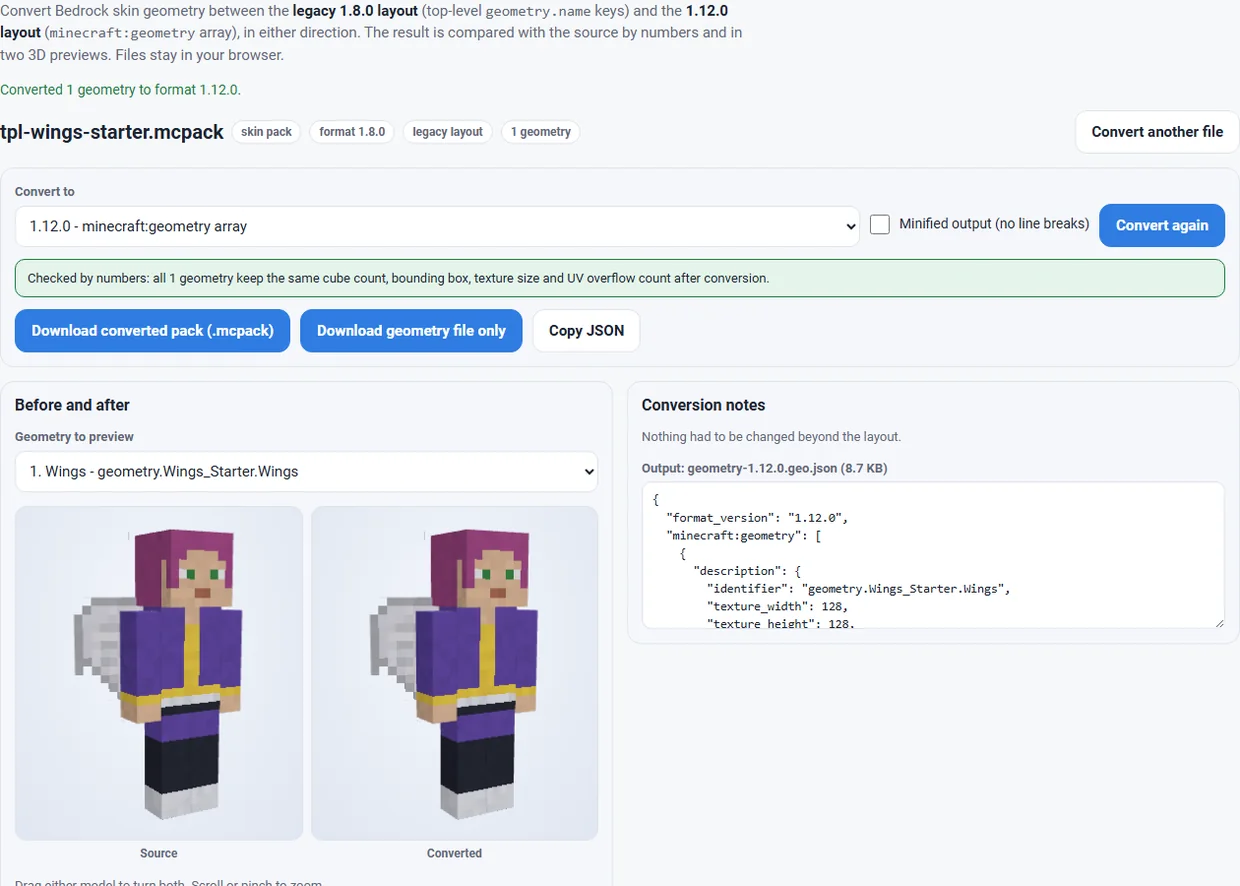
How to use the geometry converter
The on-site geometry converter runs directly in your browser without uploading your files anywhere. You can feed it a loose file, raw text, or a complete pack.
- Load your geometry or pack into the geometry converter by dropping a
geometry.jsonfile, pasting raw JSON text, or dropping a whole.mcpackor.zipskin pack (encrypted packs are refused). Once loaded, the tool reads the currentformat_versionand displays the starting stats. - Choose the target format (
1.8.0or1.12.0). The tool converts the model data in memory and updates the screen immediately. - Check the before and after numbers shown on the page. Compare the counts for
bones,cubes, visible bounds, and texture size between the original and the converted result. - Compare the two linked 3D previews by rotating and zooming the model. Both views move together so you can spot any shifted cubes or missing textures right away.
- Read the conversion notes generated below the stats. These notes list structural adjustments made during the switch, such as helper bones created for rotated cubes or copied per-face UVs.
- Download the converted result. If you loaded a single file or pasted JSON, you get a clean
geometry.jsonfile; if you dropped a whole pack, you get a complete converted pack wheregeometry.jsonis updated and every other file is copied unchanged.
// comments and trailing commas in your input file, and always outputs strict, valid JSON.What changes inside the JSON
Switching formats does more than change the format_version number at the top of the file. The two layouts wrap model metadata differently and handle rotated parts in different ways.
When moving between formats, the model header and texture keys are restructured. In the 1.8.0 layout, each model is a top-level key named by its geometry id (such as geometry.Ears_Starter.Ears), and texture dimensions use texturewidth and textureheight with no underscores. In the 1.12.0 layout, all models sit inside a minecraft:geometry list, and each model stores its identifier, texture_width, and texture_height inside a description object. If your input file uses other version stamps like 1.10.0 or 1.11.0, the tool reads them and re-stamps the output to your chosen target.
When converting from 1.12.0 down to 1.8.0, rotated cubes are moved onto helper bones. The 1.12.0 layout allows an individual cube inside the cubes list to have its own rotation and pivot. The 1.8.0 layout has no cube rotation at all - only bones can rotate. To keep the visual shape identical, the geometry converter creates a new child bone for each rotated cube and puts the pivot and rotation on that helper bone. That is why your bone count goes up in the after numbers.
Finally, UV mapping capabilities differ between the two schemas. The 1.8.0 layout only officially defines standard box UV ("uv": [u, v]), whereas 1.12.0 supports per-face uv objects. When converting to 1.8.0, the geometry converter copies per-face uv data as it is and flags it in the conversion notes.
{
  "format_version": "1.8.0",
  "geometry.Ears_Starter.Ears": {
    "texturewidth": 128,
    "textureheight": 128,
    "visible_bounds_width": 2,
    "visible_bounds_height": 4,
    "visible_bounds_offset": [0, 1.75, 0],
    "bones": [
      {
        "name": "head",
        "parent": "body",
        "pivot": [0, 24, 0],
        "cubes": [
          { "origin": [-4, 24, -4], "size": [8, 8, 8], "uv": [0, 0] }
        ]
      },
      {
        "name": "s4_cat_ears_1_l",
        "parent": "head",
        "pivot": [3, 32, 0],
        "rotation": [0, 0, 6],
        "cubes": [
          { "origin": [1.5, 31.5, -1], "size": [3, 2, 2], "uv": [65, 0] }
        ]
      }
    ]
  }
}{
"format_version": "1.12.0",
"minecraft:geometry": [
{
"description": {
"identifier": "geometry.Ears_Starter.Ears",
"texture_width": 128,
"texture_height": 128,
"visible_bounds_width": 2,
"visible_bounds_height": 4,
"visible_bounds_offset": [0, 1.75, 0]
},
"bones": [
{
"name": "head",
"parent": "body",
"pivot": [0, 24, 0],
"cubes": [
{ "origin": [-4, 24, -4], "size": [8, 8, 8], "uv": [0, 0] }
]
}
]
}
]
}Common mistakes
- Changing only the
format_versionstring by hand in a text editor. Typing"1.8.0"at the top of a1.12.0file leaves theminecraft:geometrylist anddescriptionblock intact, creating broken JSON that matches neither format; always run the file through the geometry converter instead. - Assuming a higher bone count after converting to 1.8.0 is a bug. Because
1.8.0does not support cube-level rotation, the converter must create a helper bone for every rotated cube so the parts stay angled correctly. - Unzipping a pack just to pull out
geometry.jsonand zipping it back up manually. You can drop the entire.mcpackor.zipdirectly into the geometry converter, and it will rebuild the pack with every other file untouched. - Expecting a format conversion to fix a broken
manifest.jsonorskins.jsonmismatch. The geometry converter only rewritesgeometry.json; drop the pack into the pack validator afterwards if you need to check for missing textures, bad UUIDs, or mismatched geometry ids.
Questions and answers
Why did my bone count increase when converting from 1.12.0 to 1.8.0?
The 1.12.0 format allows individual cubes to have their own rotation and pivot, while 1.8.0 only allows bones to rotate. The geometry converter moves each rotated cube onto a new helper bone so your 3D parts keep their exact angles.
What happens if my geometry file says 1.10.0 or 1.11.0?
Real packs stamped 1.10.0 or 1.11.0 use the same structure as the 1.8.0 layout. The geometry converter reads those version stamps normally and re-stamps the output to either 1.8.0 or 1.12.0 depending on your choice.
Will converting a skin to 1.8.0 make it show up in my game?
Most real 4D packs use 1.8.0, which is why our tools default to it, but which format versions the game's skin system accepts has not been confirmed in the game. Because custom geometry in skin packs is undocumented by official creator documentation, a 4D skin may not show its extra parts on current versions in either format.
Does dropping a whole pack into the geometry converter alter my textures or manifest?
No. When you drop an archive into the geometry converter, only geometry.json is converted and every other file in the pack is copied over unchanged.