
Pick a base template for free modelling in the 4D skin editor or a starter template to swap skins and tweak parts in the Quick 4D Maker, then give your pack new names and fresh UUIDs before exporting.
Which template to pick: bases vs starters
Our base templates page offers two kinds of free starter packs, all checked by our independent pack checker. Each template page has 3D previews, a file list, and three buttons: Download .mcpack, Open in the 4D skin editor, and Open in Quick 4D Maker.
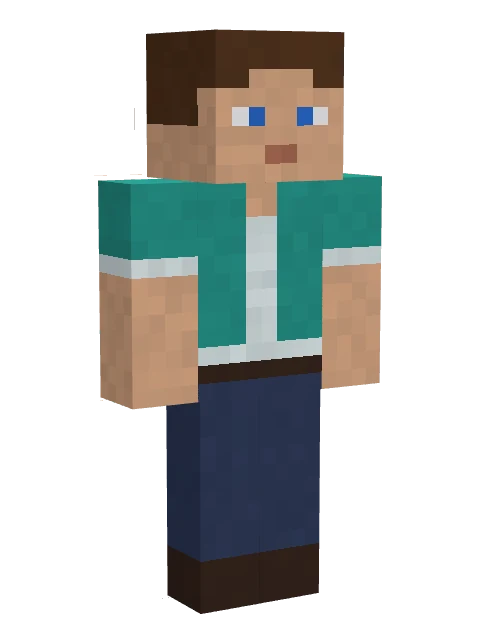
Pick a player base (Classic player base for 4-pixel arms or Slim player base for 3-pixel arms) when you want to model your own cubes from scratch in the 4D skin editor. Inside a base pack, the standard 17-bone player rig is written out as custom geometry in geometry.json using format 1.8.0 and a 64x64 UV map, paired with an original starter texture.
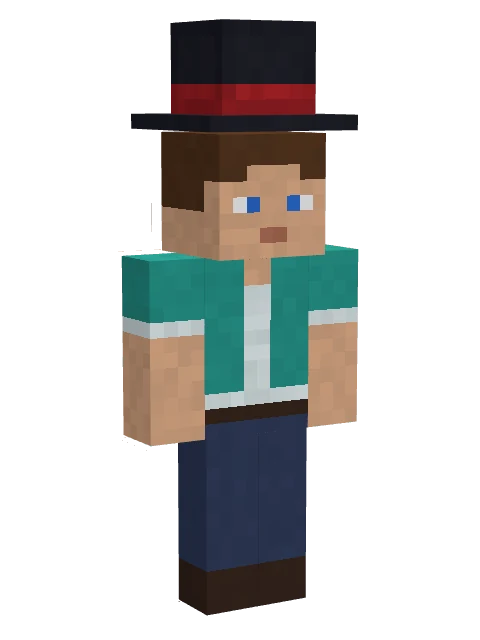
Pick a part starter when you want to customize a ready-made accessory in the Quick 4D Maker, or open it in the 4D skin editor to inspect how a finished part is parented and UV-mapped. The available starters are Ears starter (cat ears on the head), Tail starter (fox tail on the body), Wings starter (angel wings on the back, slim arms), Hat starter (top hat), and Ears and tail starter (fox ears and fox tail, slim arms). Because they were built with the Quick 4D Maker, they use a 128x128 UV texture atlas and carry an s4maker.json file so they reopen in the maker with every part still editable.
Route 1: Free modelling in the 4D skin editor
Use this route with the Classic player base or Slim player base when you want full cube-by-cube control and pixel painting, or with a starter when you want to reshape its cubes directly.
- On the template page, click Open in the 4D skin editor (or click Download .mcpack and use 4D Skin -> Open skin pack (.mcpack / .zip) inside the editor; on phones, tap the person icon in the menu row to open the 4D Skin menu).
- If the skin picker dialog appears, check the skin name, geometry id, and 3D/4D/5D badge, then select the skin to open it on the 3D canvas with the 17 standard player bones listed in the outliner.
- To use your own character texture on a 64x64 base, import your skin PNG into the texture list, or switch to the Paint tab to paint directly on the 3D model.
- In the outliner, add a new bone (group) under a standard player bone - such as under
headfor hats or ears,bodyfor wings or tails, orleftArm/rightArmfor bracelets - which is how real community packs parent parts so they may follow that body part. - Add cubes inside your new child bone, move, resize, and rotate them, and paint their surfaces in the Paint tab.
- Open the 4D Skin menu and click Skin validator to confirm there are no missing player bones, duplicate bone names, or UV rectangles outside the texture.
- Click 4D Skin -> Export 4D skin pack (.mcpack), enter a new pack name and new skin name, make sure the option for new UUIDs is enabled, confirm the live check list shows no errors, and export your
.mcpack.
Route 2: Swapping skins and parts in the Quick 4D Maker
Use this route with any of the five starters when you want to put an existing 3D part onto your own skin PNG and adjust its size, position, or colours without touching raw bones or UV maps.
- On the starter template page, click Open in Quick 4D Maker (or download the
.mcpackand load it through the maker's Projects tab using Open .mcpack / .zip) so the starter model appears in the live 3D preview. - In the Skin tab, click Choose skin image (or Paste image, Ctrl+V, or drag-and-drop) to load your own 64x64, 128x128 HD, or legacy 64x32 PNG over the starter's base character.
- Check the Arm model setting (Classic arms (4 px) or Slim arms (3 px)); the tool detects it from your PNG's transparent pixels, so switch it if the arms look wrong in the preview, and enter a new Skin name.
- Switch to the Edit tab to adjust the starter's part card - change Attach to, Position, Rotation, Size, or Colours - or open the Parts tab to add more accessories from the searchable library.
- Go to the Export tab, enter a new Pack name and Description, check the Pack check panel to ensure no errors block the download, and click Download .mcpack.
What you must change before sharing your pack
Every downloadable template on the site has fixed uuid values in its manifest.json file. Players report that the game identifies a pack by its uuid and version, refusing to import a pack as a duplicate if another pack with the same UUID and version is already installed (though this has not been confirmed in the game for skin packs).
When you export a project from the Quick 4D Maker or the 4D skin editor (with new UUIDs enabled in the export dialog), our pack writer automatically generates two fresh random version-4 UUIDs - one for the header and a different one for the skin_pack module - alongside your new pack name and skin name.
If you instead unzipped a downloaded template .mcpack and edited its JSON or PNG files by hand, you must replace the template's name, description, and both uuid values before zipping it back up, or run your finished pack through our on-site manifest fixer to generate fresh UUIDs automatically.
{
  "format_version": 1,
  "header": {
    "name": "Ears Starter",
    "description": "A classic skin with cat ears.",
    "uuid": "63a6812a-f79d-5f81-a5f7-030b15c9935d",
    "version": [1, 0, 0]
  },
  "modules": [
    {
      "type": "skin_pack",
      "uuid": "40b18f5e-b9c7-5cba-afa3-c5c03159661b",
      "version": [1, 0, 0]
    }
  ]
}Common mistakes
- Opening a Classic or Slim player base in the Quick 4D Maker to edit bones. The player bases were not created with the maker and have no
s4maker.jsonparts, so use the 4D skin editor for free modelling or add parts from the maker's Parts tab. - Opening a hand-edited 4D skin pack in the Quick 4D Maker. If you modify a starter in the 4D skin editor and later reopen that exported pack in the Quick 4D Maker, its custom geometry is dropped with a message and only the base skin texture loads.
- Putting new cubes at the root of the outliner instead of inside a child bone. Always create your custom bone as a child under a standard player bone like
headorbodyso the project passes the skin validator and matches how real packs parent their parts. - Sharing a pack with the template's original UUIDs and pack name. Always export with a new pack name, new skin name, and fresh UUIDs (or use the manifest fixer) because players report that two packs sharing the same UUID and version may clash as duplicates.
- Deleting all parts from a starter in the Quick 4D Maker and expecting custom geometry. If a skin has no visible parts left when you export, the Quick 4D Maker writes it as a plain skin using the stock player model id.
Questions and answers
Can I customize a starter in the Quick 4D Maker and then repaint its pixels in the 4D skin editor?
Yes. First swap your skin, adjust the parts, and export the .mcpack from the Quick 4D Maker, then open that .mcpack in the 4D skin editor to reshape cubes or paint pixels. Once you export from the 4D skin editor, however, you cannot reopen those edited parts in the Quick 4D Maker.
How does the Quick 4D Maker name the bones inside a starter template?
Each added part is written as child bones with an s4_ prefix followed by the part name and number under the standard player bone it is attached to, while the 17 standard player bones remain unchanged.
Why do the Wings starter and Ears and tail starter have thinner arms than my skin?
Those two starters are built on the slim player rig (geometry.humanoid.customSlim), which uses 3-pixel-wide arms instead of 4-pixel classic arms. In the Quick 4D Maker's Skin tab, you can switch the Arm model setting between Classic arms (4 px) and Slim arms (3 px) after loading your PNG.
Will a 4D skin made from these templates show its 3D parts in my game?
We cannot promise any in-game result because nothing on this site has been tested inside the game, and official documentation states that custom models cannot be added through the skin pack JSON. Your 4D skin may not show its extra parts on current versions; if the game ignores the custom geometry, the expected outcome may be the flat standard player shape and possibly a wrong-looking texture.