
 MODEL
Details
| Type | Resource pack that replaces the player model |
|---|---|
| Series | Five Nights at Freddy's |
| Character | Springtrap |
| Variants | 2: Clown, Normal |
| Own animations | None (standard player animations) |
| Animated texture | 12 frames |
| Cubes | 41 |
| Bones | 12 |
| Detail level | Detailed |
| Texture | 256 x 3072 px |
| Height | 2.41 blocks |
| Model format | 1.12.0 |
| Look | Male · Robot / android · Steve-like (classic) |
| Theme | Horror, Party & costume |
| Main colours | White, Red, Brown |
| From pack | Springtrap Skin |
| File | .mcpack resource pack, 211 KB |
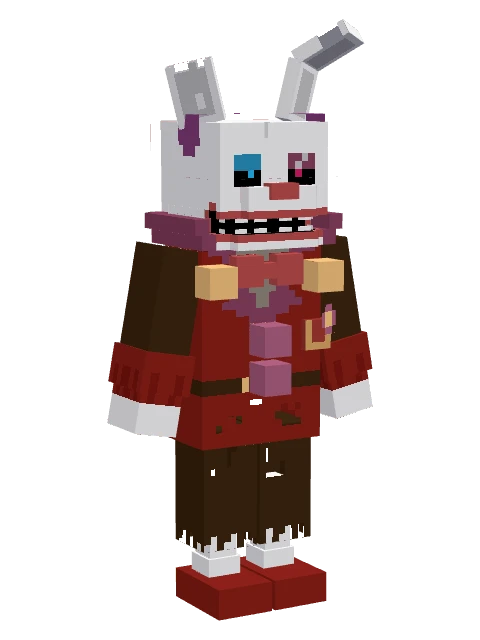
Clown Springtrap Player Model
A blocky animatronic rabbit in a red and brown clown outfit with protruding jagged rabbit ears, a collar ruff, and a toothed jaw.
What this pack does
Clown Springtrap is a player-model resource pack for Minecraft Bedrock: instead of adding a skin to the Dressing Room, it replaces the 3D model the game draws for players with its own. The model is built from 41 cubes and 12 bones. It keeps the standard player animations (walking, attacking, sneaking...) and puts them on the new body. Its texture is a 12-frame flip-book that the pack scrolls through over time (blinking eyes, glowing parts). It has 2 variants to choose from in the pack settings.
How to install
- Tap Download .mcpack and wait for the file to finish.
- Open the file with Minecraft (on Android and iOS choose Open with Minecraft, on Windows double-click it). The game imports it as a resource pack.
- Go to Settings → Global Resources → My Packs, select the pack and press Activate. To use it in one world only, add it in that world’s resource pack settings instead.
- This pack has 2 variants (Clown and Normal): after activating it, open the pack’s settings (gear icon) in Global Resources and pick one.
- Move it above other packs that change the player: the pack higher in the list wins.
A resource pack changes how players look on your own screen: it is not a skin, it does not appear in the Dressing Room, and other players only see the model if they run the same pack (or a world or server applies it to everyone). Because it replaces the game’s player files, it may break after a game update and clashes with other packs that change the player. Consoles cannot open .mcpack files. Read more: how to install a player-model pack and its limits and player-model packs explained.
More from Five Nights at Freddy's
 MODELBonnie the BunnyFive Nights at Freddy'sAnimated textureHD texture (256 px+)
 MODELChica the ChickenFive Nights at Freddy'sAnimated textureHD texture (256 px+)
 MODELFoxy the PirateFive Nights at Freddy'sAnimated textureHD texture (256 px+)
 MODELFreddy FazbearFive Nights at Freddy'sAnimated textureHD texture (256 px+)
 ANIMWithered BonnieFive Nights at Freddy'sCustom animations
 MODELMega Man Thunder BeamMega ManAnimated textureSeveral variants+1
 MODELPumpkin Animatronic RatFive Nights at Candy'sSeveral variantsHD texture (256 px+)
 MODELExplorer BombermanBombermanAnimated textureSeveral variants+1
 MODELRollMega ManAnimated textureHD texture (256 px+)